
Mid-Cycle Price Increases and Billing Continuity
OnlyFans subscription pricing can change at any time, and when a creator raises their rate mid-cycle, the platform does not bill you the difference on your current period. Instead, a specific sequence begins: auto-renewal stops, your prepaid access continues to its original end date, and you decide later whether the new price is worth paying. Understanding this timeline prevents surprise charges and helps you plan around a budget most subscribers manage month to month. This guide walks through the mechanics of mid-cycle price increases and billing continuity from the subscriber’s point of view, using the same evaluation framework behind BestOnlyFans ranking write-ups.

Platform Mechanics of Creator Price Change Events
A creator edits their subscription price in their account settings, and the platform processes that change against the existing subscriber list. Processing is not instantaneous for every subscriber at once; it propagates through subscription records, which is why two subscribers on the same page can see the notification at slightly different times. What matters is the timestamp attached to your subscription record, not the moment you happen to log in. BestOnlyFans refreshes its rankings every month.
You may see a status change on the subscription management page, and depending on your notification settings, you may also receive an email or an in-app alert. The creator may or may not send a direct message explaining the change — that part is optional and entirely their choice. The BestOnlyFans method stays consistent across updates.
Five system-generated notifications typically appear:
- A dashboard banner the next time you log in
- An email summary sent to your registered address
- An in-app push notification if you enabled them
- A status change on the subscription management page
- An optional direct message from the creator if they choose to explain
None of these notifications constitutes a charge. They are informational only. The actual billing consequence is the auto-renewal flag flipping off, which is covered in the next section.

Auto-Renewal Cancellation and Access Preservation Rules
This is the single most important rule in the entire process: when a creator raises their price, the platform stops auto-renewal on affected subscriptions. Your card will not be charged the new amount without your explicit action. That protection exists precisely so subscribers are not silently moved onto a higher rate.
Because you already paid for the current period at the old price, you retain full access until that period expires. The two facts — renewal off, access on — are frequently confused, and conflating them leads people to cancel unnecessarily or to assume they have been overcharged when they have not.
Four access continuity guarantees apply during the prepaid period:
- Full library access through the prepaid period
- Message receipt without reply restrictions
- Continued ability to buy tips and pay-per-view content
- Wallet credit remains usable for platform features
Tip: check your subscription management page the day you receive a price change notice. If auto-renew shows as off, the system behaved correctly. If it still shows as on, screenshot the page and contact support before the renewal date.
One practical wrinkle: if you manually renew before the period ends, you are accepting the new rate and starting a fresh cycle.

Calendar Calculation for Access End Dates
Your access end date is the original renewal date, not the date of the price change notice. This trips people up constantly. If your subscription renews on the 14th of each month and the price change lands on the 3rd, your access still runs to the 14th.
Timezone handling adds a small complication. Billing dates are recorded against the platform’s reference time, so a subscriber in a distant timezone may see the expiration flip a few hours earlier or later than expected in local time.
A five-step verification process keeps the date straight:
- Locate your original subscription start date in account settings
- Confirm your billing cycle length — monthly is standard
- Check the timestamp on the price change notification
- Calculate the prepaid period remaining from the original renewal date
- Set a calendar reminder for two days before that date as your decision deadline
The decision window closes quietly otherwise, and access simply lapses.

Decision Points at Price Increase Notification
Each option has a different effect on billing and on the relationship with the creator. There is no universally correct answer; the right one depends on how much you value the content relative to the new price.
| Option | Immediate Effect | Long-Term Implication |
|---|---|---|
| Renew manually at the new rate | Fresh billing cycle starts at the higher price | Continuous access, higher recurring cost |
| Do nothing and let it lapse | No charge; access ends at the original date | Clean break, easy to reverse later |
| Cancel now, use the remaining period | Auto-renew already off; nothing further changes | Same outcome as lapse, with explicit confirmation |
| Move to the free tier if offered | Paid access ends at period close | Limited content via pay-per-view and tips only |
The free-tier option deserves a note. Free pages set the subscription price to $0 and monetize through pay-per-view messages and tips, with PPV unlocks running up to $50 and paid chat commonly priced at $3 to $5 per message.

Budget Impact Scenarios by Price Increase Magnitude
The platform’s paid subscription range runs from $4.99 at the minimum to $49.99 at the maximum, with most paid pages sitting between $4.99 and $15 and averages clustering around $5 to $10. That range defines how large a price jump can realistically be.
Promotional pricing is a special case: first months can legally sit below $4.99, for example $3 for the first month, but the base price may not go below $4.99. Confusing a promo rate with a base rate is the most common source of sticker shock.
Six price jump categories cover most real situations:
- Minimum adjustment to the next tier, often one or two dollars
- Standard increase of roughly 20 to 30 percent
- Doubling from a promotional rate to the standard base rate
- Crossing a psychological threshold such as $10 or $20
- Moving between content category norms
- Approaching the platform maximum of $49.99
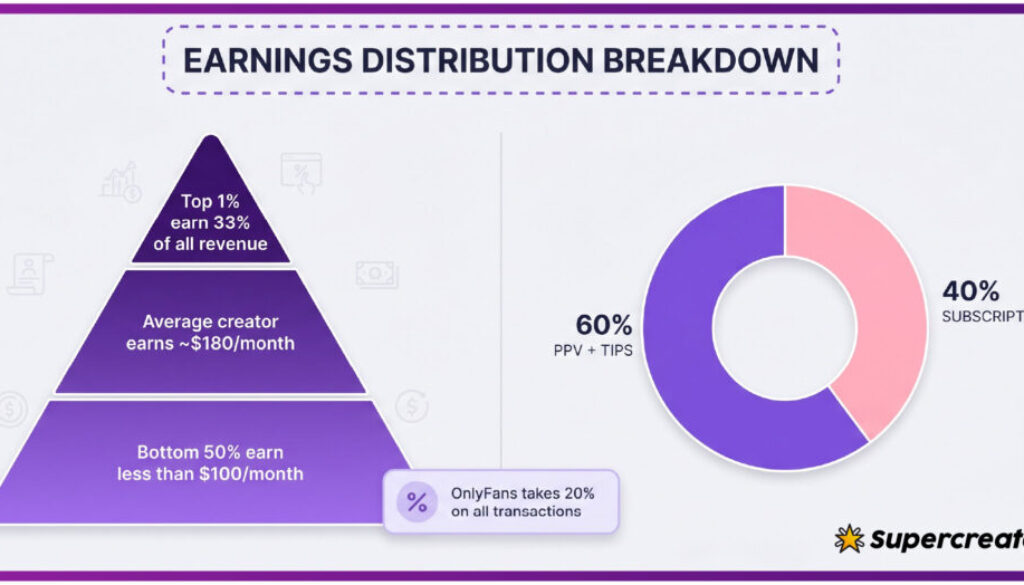
Remember the platform economics underneath all of this: the fee is 20 percent on everything, and the creator keeps 80 percent. A $2 increase is roughly $1.60 in the creator’s pocket. If you want to compare how different pages price their tiers before committing to a higher rate, a community-compiled list of the best onlyfans accounts reddit threads is a reasonable starting point for cross-checking norms.
Creator Communication Patterns Around Price Changes
Notice practices vary widely, and the quality of communication is often a better signal than the size of the increase itself. Some creators explain the change in advance; others let the system notification do the talking.
When evaluating a justification, ask whether the reason is verifiable and whether it affects you. A stated shift toward more frequent posting is checkable against the actual posting history. Only one of those can be confirmed.
| Notice Type | Typical Lead Time | Information Quality |
|---|---|---|
| No advance notice | None | System notification only |
| Social media announcement | Several days to weeks | Variable, often promotional in tone |
| Direct message explanation | Days to weeks | Usually specific to the audience |
| Tier restructuring with options | Weeks | High; multiple price points presented |
| Grandfathering existing subscribers | Weeks | High; old rate preserved for current base |
Grandfathering is worth watching for. When a creator keeps existing subscribers at the old rate while new subscribers pay more, the continuity question is settled in your favor.

Re-Entry Timing After Lapsed Access Periods
Letting access lapse is not irreversible. The creator’s page remains visible, and resubscribing later is a single action. The strategic question is timing: when does coming back cost the least and deliver the most?
Content backlog is the main variable. If a creator posts frequently, a gap of a few weeks builds a substantial library to catch up on. Pair that with promotional cycles, and a deliberate gap can be cheaper than continuous renewal at a raised rate.
Five factors shape resubscription timing:
- Likelihood of an upcoming promotional cycle
- Content backlog size versus your consumption rate
- Changes in the creator’s posting frequency
- Availability of alternative creators at your preferred price
- Alignment with your own monthly budget cycle
One caution applies here. Suspicious messages sometimes imitate subscription or billing notices, especially around price changes, which is a known pattern in phishing campaigns targeting subscription services. Verify any billing change inside the platform rather than through a link in an email.
Documentation for Subscription Management Records
Note the page, the price you originally paid, the date of any price change notice, and the access end date. A one-line entry per event is enough to reconstruct your billing history if a charge ever looks wrong.
This matters most during disputes. If a charge appears that you did not authorize, having dates and amounts on hand shortens the support conversation considerably. Card verification holds, for instance, are $0.10 and refunded within days, a small temporary line item that alarms people who do not expect it.
Review the record quarterly. Subscriptions that no longer earn their place in your budget are easy to miss when they renew quietly, and the whole point of tracking price changes is to make renewal a decision rather than a default.
FAQ
Will my OnlyFans subscription auto-renew at the higher price if I do nothing?
When a creator raises their price, auto-renewal stops on the affected subscription. If you take no action, the subscription simply expires at the end of the period you already paid for, and no charge at the new rate occurs.
Can I still access content after a price increase if I don’t pay the new rate?
Yes, until your prepaid period ends. The price change does not shorten the period you already purchased. You keep full library access, message receipt, and the ability to buy tips and pay-per-view content until the original renewal date passes.
What happens if a creator lowers their price after I canceled due to an increase?
You would need to resubscribe manually at the new lower rate. If the creator offers a promotional first month below $4.99, that promotional rate can apply to your resubscription, but the base price cannot drop below $4.99.
How do I calculate exactly when my access ends after a mid-cycle price change?
Find your subscription start date in account settings, confirm the monthly cycle, and count forward to the next renewal date that follows the notice. Treat the result as approximate within one day and renew a day early if you intend to continue.